

Maximizing Your Premium Membership: Using Your JHQ+ Core and Jurisdiction Groups
 As a premium member of Justice HQ, you belong to an exclusive group of vetted consumer advocate attorneys. Now that the platform is open to the broader legal industry, your access to the JHQ+ Core Group and Jurisdiction Groups — both marked with the JHQ+ symbol—set you apart.
These groups are only available to Premium Members, ensuring your most private conversations safely happen within a trusted circle of attorneys committed to consumer justice (attorneys practicing defense work and the larger legal community will not have access to these groups).
Your Core Group: Trusted, Nationwide Collaboration
Your JHQ+ Core Group is a curated, private space that includes attorneys across the United States. It is designed for high-level collaboration, case brainstorming, and referrals among like-minded professionals.
How to use your Core Group effectively:
- Share and support: Exchange pleadings, strategies, and resources in a private and reliable space.
- Refer confidently: When you're looking to co-counsel or refer out-of-state, your Core Group should be your first stop.
How to access the JHQ+ Core Group:
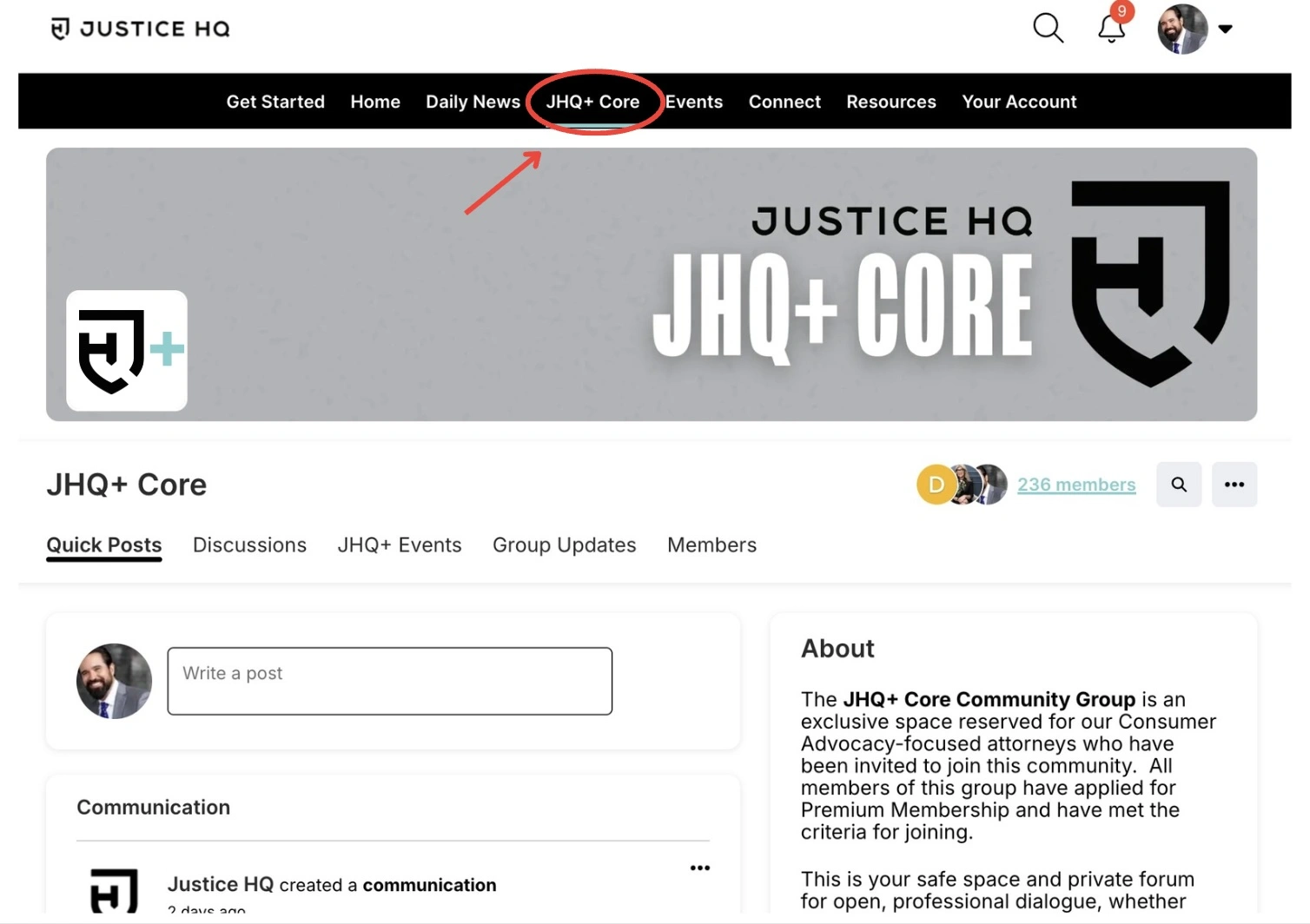
From both the desktop and mobile app versions, you can easily access by clicking on the JHQ+ Core tab in the main menu.
Desktop
Your Jurisdiction Group: Focused, Local Insight
Your Jurisdiction Group connects you with other JHQ+ members licensed in the same state(s). These groups are all about relevant, localized discussion—from rule updates to judge-specific insights.
Key features of your Jurisdiction Group:
- Automatic placement: You’re automatically added to jurisdiction groups based on the states you’re licensed in (although if we’ve missed one, please go ahead and request to join!).
- Stay updated: Get real-time intel on local practices, judge behavior, and procedural changes.
- Collaborate locally: Coordinate with members for court coverage, regional events, and shared local resources.
Because Jurisdiction Groups are exclusive to JHQ+ attorneys, you can trust that your questions and contributions stay within a vetted legal community.
How to access your Jurisdiction Group(s):
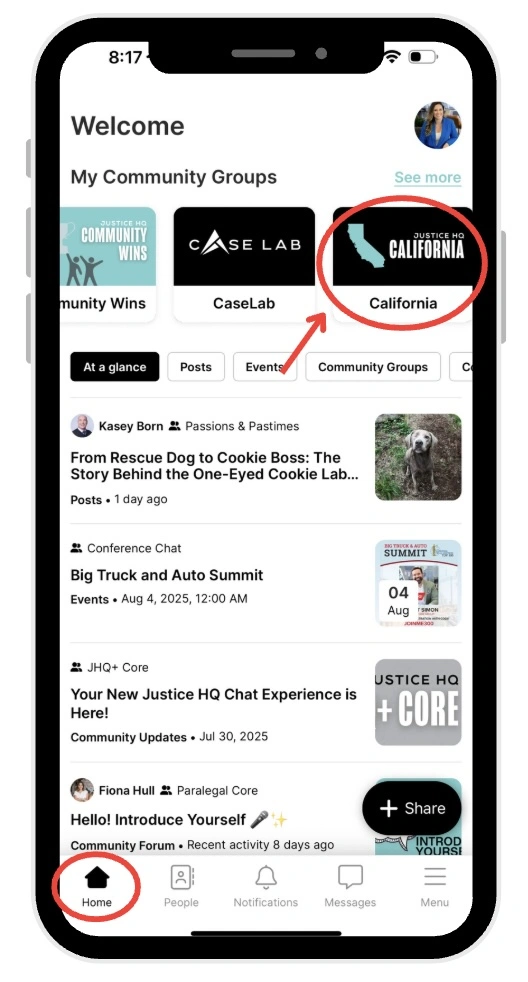
You can access your state jurisdiction group(s) in the same way that you access all of the other community groups that you have joined. From both the mobile and desktop, hit the Home tab, and all of your groups will be listed at the top of the page under ‘My Community Groups’.
Mobile
Remember: If you’re wanting to tap into your network of vetted consumer attorneys, look for the JHQ+ symbol to ensure you’re interacting within these exclusive spaces. Whether you’re tapping into national knowledge or local expertise, these groups are here to help you build stronger cases and a stronger network—with attorneys you can trust.
Need help navigating your groups? Reach out to our Community Manager anytime—we’re here to support you!